
Overview
Some technical issues that Residents experience inside Second Life are specific to a particular version of the Second Life simulator code, sometimes called the server. While most of Second Life runs on the same version of server-side code, Linden Lab does have testing groups with selections of regions that are given code updates in a phased roll-out -- that is, a testing group might get a new code update early to ensure that it's fully stable before the entire grid receives it. These testing groups are referred to as channels.
Each channel runs a particular version of the Second Life simulator code, and you can see which version of the code a region is running and which channel it's on by going to Help > About Second Life while your avatar is inside the region.
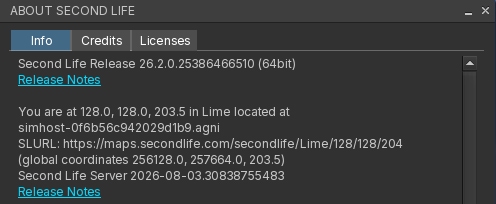
In the image above, the server version and channel are just above the link to the Release Notes, a website which contains information about different server versions. In the image, the region Lime is currently running on the Second Life Server channel and the version number 2026-08-03.30838755483.
Server version numbers start with the date the code was finalized, followed by a unique build number.
To view a region's server channel and version:
- Log in and teleport to the region you're interested in.
- Inside the region, click Help > About Second Life in your viewer.
- The line above the Release Notes link is your server channel and version.
The About Second Life information window has a copy button on the bottom for convenience, and includes other useful technical information about your viewer, basic hardware, and the region you're in. It's very helpful to include this info if the support or development team asks for it as part of technical troubleshooting.
What do the server channel names mean?
If the region is running on the channel called Second Life Server, it's running the default main server code that most of Second Life uses. Regions on this channel will restart for regular maintenance on Tuesday mornings (SLT/Pacific time).
If the region is running on a channel that has the letters RC in the name, such as Second Life RC Magnum, it's potentially using a release candidate version of the simulator code. You can compare the version number of a release candidate channel to the release notes to see what new features or bug fixes are included in that version of the code. Release Candidate (RC) channels restart for weekly maintenance on Wednesday mornings (SLT/Pacific).
From time to time, other special channels might be brought online for specific projects. These channels will typically have the project name in their title, or some other information available in the release notes if applicable. If you're curious about which channel and version a region is running, please contact our Support team for more information.
If you're a region owner, and you'd like to request that your private region or estate be running on a particular Second Life channel (for example, to ensure weekly restarts happen on a specific day of the week), please contact our Support team for assistance.